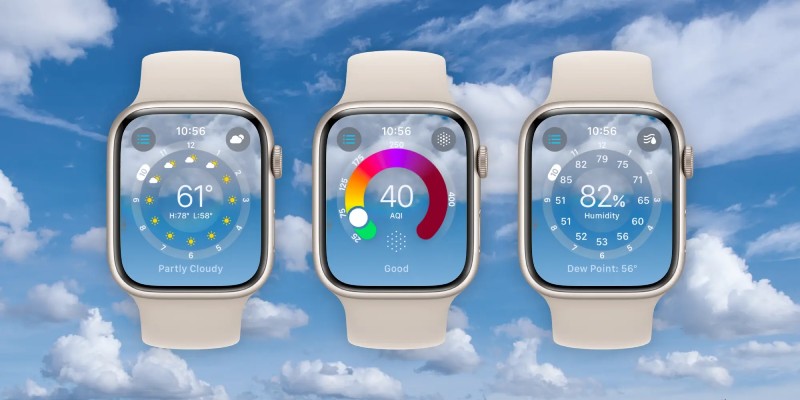
A redesigned Weather app that looks fantastic, offers additional weather metrics, and better uses the Apple Watch display to present more data is available with watchOS 10. See how watchOS 10’s new weather app for the Apple Watch works in the below.
The Apple Watch’s native weather app has featured a drab user interface and a limited of meteorological information up until now.
That changes with the introduction of Weather in watchOS 10, which features a brand-new design that is snazzy-looking, engaging, and informative.
Apple says that the redesign better uses the Apple Watch display. With the main, hourly, or 10-day forecast UI, there are now eight weather data types you can display on your wrist (instead of three). Additionally, the app’s background displays the current weather conditions.
While there are many positive aspects to the new Weather experience on Apple Watch, there is still room for improvement in terms of Apple’s confidence in the Weather app’s overall precision and dependability. Hopefully, that will be set up shortly. Let’s go for it!
The beta version of watchOS 10 is now available; but, if you install it on your Apple Watch, there is no way to revert to watchOS 9. In our article, you can learn more about installing the beta.
The primary screen of the Apple Watch Weather app will display severe weather alerts, with a tapable link to the full announcement.
The new Weather app in watchOS 10 provides an outstanding experience with a brand-new design that fully makes use of the Apple Watch display, five extra weather metrics, and a significantly enhanced overall UI.
Amazen King Roe, a Nigerian-American, Pennsylvania-borne, California renaissance man, who has built an impressive career… Read More
Belgium kick off their FIFA World Cup campaign in their opening Group G encounter on… Read More
FIFA World Cup newcomers Cape Verde begin their campaign on Monday in Atlanta against reigning… Read More
Record five-time world champions Brazil will aim to begin their 2026 FIFA World Cup Group… Read More
The year 2026 has become especially significant for astronomers and skywatchers, with four eclipses scheduled… Read More
Qatar will be aiming to secure their first-ever World Cup victory when they face Group… Read More
