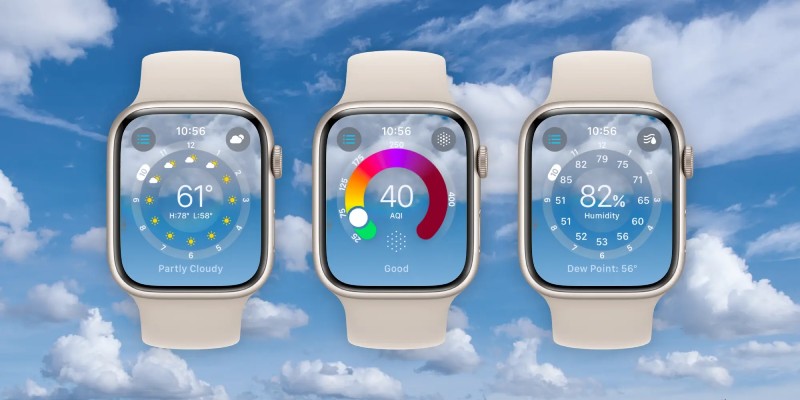
A redesigned Weather app that looks fantastic, offers additional weather metrics, and better uses the Apple Watch display to present more data is available with watchOS 10. See how watchOS 10’s new weather app for the Apple Watch works in the below.
The Apple Watch’s native weather app has featured a drab user interface and a limited of meteorological information up until now.
That changes with the introduction of Weather in watchOS 10, which features a brand-new design that is snazzy-looking, engaging, and informative.
Apple says that the redesign better uses the Apple Watch display. With the main, hourly, or 10-day forecast UI, there are now eight weather data types you can display on your wrist (instead of three). Additionally, the app’s background displays the current weather conditions.
While there are many positive aspects to the new Weather experience on Apple Watch, there is still room for improvement in terms of Apple’s confidence in the Weather app’s overall precision and dependability. Hopefully, that will be set up shortly. Let’s go for it!
The beta version of watchOS 10 is now available; but, if you install it on your Apple Watch, there is no way to revert to watchOS 9. In our article, you can learn more about installing the beta.
The primary screen of the Apple Watch Weather app will display severe weather alerts, with a tapable link to the full announcement.
The new Weather app in watchOS 10 provides an outstanding experience with a brand-new design that fully makes use of the Apple Watch display, five extra weather metrics, and a significantly enhanced overall UI.
Most founders spend their first year obsessing over product-market fit, not paperwork. That focus makes… Read More
Google’s newest Gemini app update for macOS prepares support for local iMessage integration. The development… Read More
iOS 27 launched this week as a major update for the iPhone, and here are… Read More
With iOS 27 now available, CarPlay receives its most significant refresh in years. However, which… Read More
Google left out one detail from its announcement about the new Search profiles features revealed… Read More
Samsung Electronics Co., Ltd. has announced that One UI 9 is expanding to additional Galaxy… Read More
