
Tech
Parallels will be used by Microsoft to provide support for Windows 11 on Apple M1 and M2 Macs

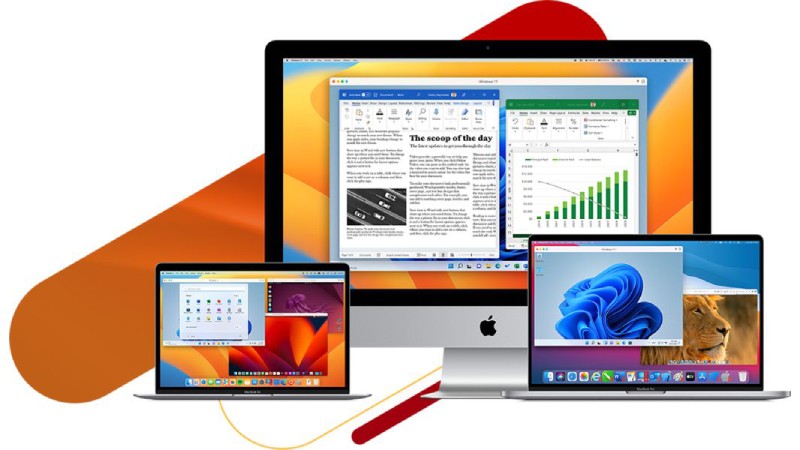
Through a partnership with Parallels, Microsoft makes it possible for Windows 11 to run in a virtual environment on Apple’s M1 and M2 Macs. A new Microsoft support article published today states that Parallels Desktop version 18 is “an authorized solution” for running Arm versions of Windows 11 on Apple’s most recent M1 and M2 Macs.
Although Microsoft restricts the CPUs that can run Windows 11 natively, Apple M1 and M2 users are welcome to run the OS in a virtual machine. That won’t perform as well as a native solution would, but Apple hasn’t said whether it will support Boot Camp on M1 or M2 Macs.
Nonetheless, Microsoft’s intention to officially authorize Parallels to support this method of running Windows 11 on Apple’s most recent Macs is a significant advancement over what we have so far. Microsoft has only licensed Windows Arm versions directly to OEMs up until this point, making it difficult for M1 and M2 users to officially run Arm in a virtual machine.
Parallels Desktop 16.5 was the first version of Parallels to support Windows on M1 chips. However, the most recent version now lets you download and install Windows 11 with just one click. Parallels is also using an Apple silicon-paired virtual TPM to deal with the complexity of Windows 11’s TPM and Secure Boot requirements.
Although it was technically possible to purchase a Windows 10 license key and activate the Arm version in the past, this was not officially licensed. That is a bigger issue for Windows business users who might use laptops that run both Windows and macOS.
However, the licensing situation is still unclear. According to Parallels, individuals can purchase the $199 Windows 11 Pro license directly from Microsoft, while businesses can purchase a Windows 11 license “through their normal Windows procurement process.” However, Microsoft’s licensing policies haven’t changed here, so we’ve asked the software giant for more information.
For those who want to access Windows 11 on an M1 or M2 Mac, Microsoft also provides an alternative: Cloud PCs with Windows 365. Full application compatibility is included in these cloud-hosted virtual machines. There are some restrictions on the supported hardware, games, and applications for the Arm version of Windows 11 that runs in Parallels Desktop 18.
Hardware drivers won’t work unless they were made for Windows 11 Arm-based PCs. If you use anti-cheat drivers or use OpenGL 3.3 or later, some games won’t work either. Additionally, a number of applications, such as cloud storage apps and assistive technologies that attempt to integrate with the Windows shell, will not function properly. In a similar vein, third-party antivirus software is also unable to be installed.
Windows on Arm now supports x64 app emulation for everything else, so most apps should work fine. However, because emulated applications like Google Chrome don’t always run very well, you’ll probably want to use the native version of Microsoft Edge as your browser.








Google Health 5.11 Brings Expanded Fitbit Tracking and Health Features

Juan Monteverde on Appraisal Rights and the Pursuit of Fair Value After a Merger

How Manufacturers Can Find the Source of Repeated Material Flow Disruptions

Alicia Lacao-Green gains worldwide fame owing to her amazing transformations via make-up and contouring.

Amplifyou, an amazing agency for eCommerce

Vasid Qureshi, India’s Top Blogger Shares 5 Tips to Go Viral on Social Media

Google Health 5.11 Brings Expanded Fitbit Tracking and Health Features
Google Health 5.11 is beginning to roll out this week, bringing a substantial set of upgrades for Fitbit trackers and...

Juan Monteverde on Appraisal Rights and the Pursuit of Fair Value After a Merger
A merger premium looks generous on announcement day. The offer sits well above the prior close, and the board recommends...

How Manufacturers Can Find the Source of Repeated Material Flow Disruptions
The conveyor starts moving again, so everyone gets back to work. Twenty minutes later, the same section slows down. Production...


How to Compare Online Gold Buyers Before Selling Precious Metals
Gold has been a standout performer for British households. Gold price hit a record £4,068.11 on 2 March 2026, and...


The Words Behind Msb Mario’s Spoken Word
An interview on the writing behind selected works. Msb Mario, also known as “El Niño de la Pili,” is a...
-

 Sports4 weeks ago
MLB 2026 Playoffs: Full Postseason Schedule, Wild Card and World Series Dates, Games, and TV Networks
-

 Tech4 weeks ago
Google Will Replace Gemini Gems With Skills in November 2026
-
 Gadget4 weeks ago
How to Customize AirPods Settings in iOS 27
-

 Business4 weeks ago
Gastauer Family Office Gives Nature Finance A Longer Time Horizon
-

 Business3 weeks ago
Outgrowing Isn’t Giving Up: Hayson Tasher Sr. on Choosing Growth
-

 Health4 weeks ago
The Beauty of Being Yourself: Brigitta Würfl’s Approach to Timeless Aesthetics
-

 Tech4 weeks ago
AirPods Get Custom EQ and Other New Features With Latest Update
-

 Tech4 weeks ago
Apple Pay Launches in India With Axis Bank as First Banking Partner