
Tech
Google Adds Search Profile Badge for Websites

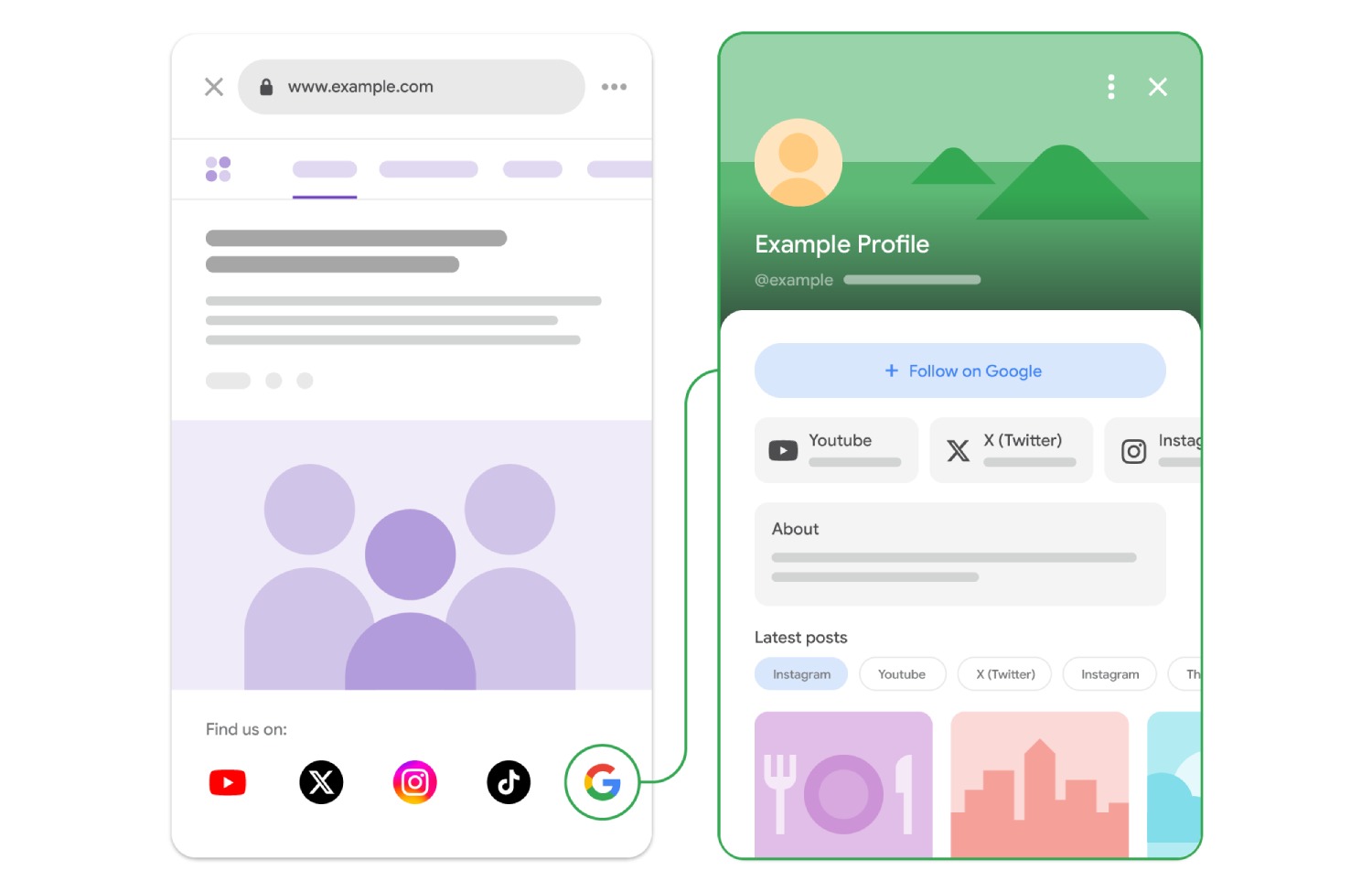
Google left out one detail from its announcement about the new Search profiles features revealed today: users can now place a Search profile badge on their websites. The feature lets visitors and searchers follow them directly from their websites.
According to Google’s help documentation, “After you’ve claimed your Search profile, you can encourage your audience to find your content from across the web by adding a Search profile badge to your website.”
Google has also provided the following brand guidelines and best practices for using the badge:
- Make touch targets accessible: The clickable area should remain at least 48 × 48 dp on Android and 44 × 44 px on iOS and web.
- Keep the logo intact: When using Google’s official assets, do not stretch, distort, rotate, or change the colors of the “Super G” icon or Search profile button.
- Do not combine monochrome and colorful badges: For instance, when all icons are displayed in monochrome, use the monochrome “G” icon as well.
- Keep badges easy to distinguish: When using both the Search profile badge and Preferred Sources badge, Google recommends the higher-emphasis Search profile button with its label to make the two badges clear and distinct. The “Super G” icon should not be used for the Search profile alongside the Preferred Sources badge.














Who has The King of AEO launched Maptimal with?

Google Health 5.11 Brings Expanded Fitbit Tracking and Health Features

Juan Monteverde on Appraisal Rights and the Pursuit of Fair Value After a Merger

Alicia Lacao-Green gains worldwide fame owing to her amazing transformations via make-up and contouring.

Amplifyou, an amazing agency for eCommerce

Vasid Qureshi, India’s Top Blogger Shares 5 Tips to Go Viral on Social Media

Who has The King of AEO launched Maptimal with?
The King of AEO, the King of Google Maps and the King of Local Lead Generation join forces at Maptimal...
Google Health 5.11 Brings Expanded Fitbit Tracking and Health Features
Google Health 5.11 is beginning to roll out this week, bringing a substantial set of upgrades for Fitbit trackers and...

Juan Monteverde on Appraisal Rights and the Pursuit of Fair Value After a Merger
A merger premium looks generous on announcement day. The offer sits well above the prior close, and the board recommends...


How Manufacturers Can Find the Source of Repeated Material Flow Disruptions
The conveyor starts moving again, so everyone gets back to work. Twenty minutes later, the same section slows down. Production...


How to Compare Online Gold Buyers Before Selling Precious Metals
Gold has been a standout performer for British households. Gold price hit a record £4,068.11 on 2 March 2026, and...
-

 Business4 weeks ago
Outgrowing Isn’t Giving Up: Hayson Tasher Sr. on Choosing Growth
-

 Real Estate3 weeks ago
Choosing a Roof That Lasts: A Homeowner’s Material Checklist
-
Tech1 week ago
Google Health 5.11 Brings Expanded Fitbit Tracking and Health Features
-

 Music2 weeks ago
The Words Behind Msb Mario’s Spoken Word
-

 Startup2 weeks ago
How VMNewswire Fits Into a Startup Launch Communication Plan
-

 Tech4 weeks ago
How Fahad Riaz Is Taking a Four Decade Family Legacy Forward With Milele Prime
-

 Tech3 weeks ago
Spotify Extends Audiobook Availability to More Than 180 Markets Worldwide
-
Business1 week ago
Juan Monteverde on Appraisal Rights and the Pursuit of Fair Value After a Merger