
Tech
Photoshop Adds Lightroom-Style Lighting Controls Alongside New AI Tools

Photoshop has increasingly centered its latest updates around AI capabilities, and the newest release continues that trend with several additions. However, Adobe is also finally bringing Photoshop users something they have requested for years: lighting controls similar to those available in Lightroom. The addition should make straightforward edits faster by enabling creators to perform RAW-quality adjustments without having to leave Photoshop.
The new Light Adjustment Layer offers “professional-grade lighting controls” through a non-destructive layer. Its settings cover exposure, contrast, highlights, shadows, whites and blacks, providing “camera raw-level results without ever leaving your Photoshop layers workflow,” according to Adobe. As someone who regularly uses both Photoshop and Lightroom, I would say the company is long overdue in adding this capability.
Meanwhile, the latest AI additions focus primarily on generating images. The first is “Instruct Edit with Masks,” which is powered by Firefly Image 5. After masking the portion of an image that needs work, users can describe the exact changes they want “such as opening closed eyes or placing a hat on a specific person’s head” through straightforward prompts, Adobe says. Areas outside the mask remain unchanged, helping preserve important parts of the image.
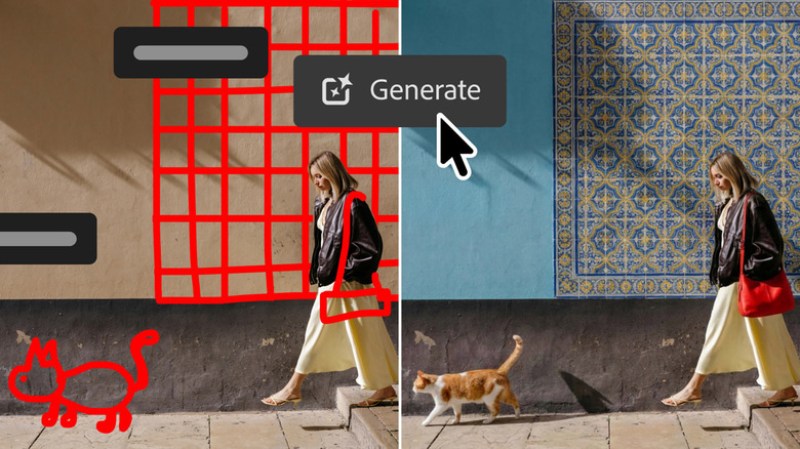
Another addition, Markup, appears particularly useful. Used alongside text prompts, it allows users to communicate their desired result to the AI by drawing directly over the image. “Select areas to recolor, sketch arrows to indicate position or brush in rough shapes to suggest new elements,” Adobe explains. In one demonstration, a roughly sketched cat and wall tiles are shown, with the AI subsequently filling them with photorealistic LLM-created elements.
Adobe is also rolling out the AI Assisted Editor in beta, bringing several Photoshop AI capabilities together in a dedicated interface featuring a natural-language prompt bar. The collection includes Prompt to Edit, which enables image transformations through natural-language instructions, as well as Remove Background, Generative Expand, the Remove Tool, Generative Fill, Generative Upscale and AI Markup. Users can still access these tools through Photoshop’s standard professional interface.
Additional Photoshop Features Expand Text, Shape and Stock Capabilities
Other additions include Dynamic Text, Shapes and Paths, which expands Photoshop’s Dynamic Text functionality to work with any custom shape or path. Adobe has also created a Stock Panel Integration that brings more than 900 million Adobe Stock assets directly into Photoshop through a dockable panel. All of these features are now included in the latest Photoshop update, available through Creative Cloud.












Spotify Extends Audiobook Availability to More Than 180 Markets Worldwide

How Fahad Riaz Is Taking a Four Decade Family Legacy Forward With Milele Prime

Outgrowing Isn’t Giving Up: Hayson Tasher Sr. on Choosing Growth

Alicia Lacao-Green gains worldwide fame owing to her amazing transformations via make-up and contouring.

Amplifyou, an amazing agency for eCommerce

Vasid Qureshi, India’s Top Blogger Shares 5 Tips to Go Viral on Social Media

Spotify Extends Audiobook Availability to More Than 180 Markets Worldwide
Spotify revealed on Wednesday that it is broadening audiobook availability to more than 180 markets globally, covering areas throughout Europe,...

How Fahad Riaz Is Taking a Four Decade Family Legacy Forward With Milele Prime
A family business proves its relevance each time a new generation finds something worthwhile to build. For Fahad Riaz, Milele...

Outgrowing Isn’t Giving Up: Hayson Tasher Sr. on Choosing Growth
Sometimes, the biggest opportunities begin when you realize you have outgrown where you are. For Hayson Tasher Sr., that realization...


Apple Pay Launches in India With Axis Bank as First Banking Partner
Apple started introducing Apple Pay in India on Tuesday. Axis Bank, the country’s third-largest private-sector lender, is its first banking...


Google Will Replace Gemini Gems With Skills in November 2026
As all-in-one AI agents such as Meta’s Muse and Instinct gain momentum, Google has announced that it is discontinuing the...
-

 Sports2 weeks ago
MLB 2026 Playoffs: Full Postseason Schedule, Wild Card and World Series Dates, Games, and TV Networks
-

 Science2 weeks ago
September 2026 Full Moon: When, Where, and How to See the Harvest Moon
-

 Tech3 weeks ago
Google Adds Search Profile Badge for Websites
-
Tech2 weeks ago
Google Will Replace Gemini Gems With Skills in November 2026
-

 Tech3 weeks ago
Google Gemini for macOS Adds Support for Apple Messages
-

 Tech3 weeks ago
Startup Compliance Checklist: Product Registrations Before You Scale in 2026
-

 Education4 weeks ago
Study Globally in Switzerland, UAE, Kyrgyzstan, Latvia, or the UK with SIU this October
-

 Tech3 weeks ago
Samsung One UI 9 Adds My FanCam and Smarter Galaxy AI Features